This page describes the MCF format used in most of MIRA's mapping toolchain, as well as some underlying data structures and concepts.
- MCF files
- Occupancy grid maps
- Nogo map
- Speed map
- One way map
- Primitive information
- Where to go from here
MCF files
A map configuration file contains all the information that is necessary to describe the mapping structure we use. A typical MCF file looks like this:
Occupancy grid maps
As you can see, the MCF file provides a name for the map and references three separate map files: static, nogo and speed. Each of these maps is described by a XML file, which looks like this:
The image tag references the PNG file containing the actual occupancy grid map information, while the CellSize and Offset tags describe the occupancy grid information contained in the PNG file. To be able to load the PNG file, it is necessary to know how big one of the pixels is supposed to be in metric units. This is called the cell size of the map, and in the example above, a pixel equals 0.05m = 5cm. It is also necessary to know where the origin of the coordinate system is within the PNG file. This is described by the offset parameters. Using this information, the occupancy grid map below can be loaded correctly:

This type of map is called the static map, because the occupancy grid information contained in it isn't subject to change while the map is up to date. Using this information about the environment, the robot is able to localize itself and drive autonomously.
Nogo map
Another type of map is the so called nogo map. This map serves a different purpose than the static map. Rather than describing the environment in small, discrete cells, it realizes the abstract concept of nogo areas, which the robot is prohibited from entering. This spacial binary encoding is implemented using a black and white map with the same dimensions and parameters as the corresponding static map:

Black areas are allowed, while white areas are prohibited (i.e., our nogo areas). Overlaying the nogo and static map, it is clear which areas of the map the robot may not enter. When driving autonomously, the Pilot will consider the nogo map in its path planning.
Speed map
The third type of map is the so called speed map. In certain areas, it may be desireable or required for the robot to drive slower, either because of special obstacles or low noise requirements. The speed map forces the robot to limit its speed to a certain percentage of its top speed. Like the nogo map, this is encoded as a grey-scale map of the same dimensions and parameters as the corresponding static map. The grey value of a certain pixel specifies the speed percentage allowed at this position, e.g. a grey value of 120 would equal a speed limit of 120 / 255 = 47% top speed. Naturally, white areas will impose no speed limit. Below is an example of how such a map looks:
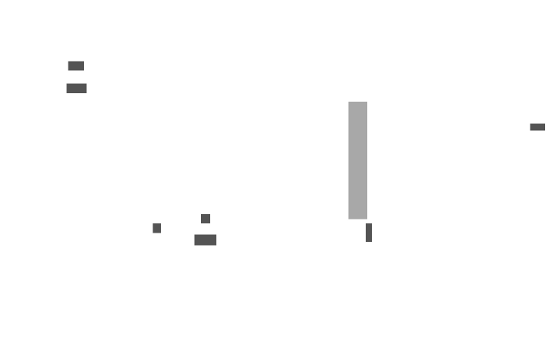
If you were to overlay this speed map with the static map, you'd see that all the doorways have a top speed of about 33%, because the doorsteps would cause the robot to shake.
One way map
The last type of map is the so called one-way map. It can be used to introduce restrictions on the direction robots are allowed to traverse a certain area in. Imagine a busy hallway in a factory where there are strict enforcements for people to walk on the right at all times to avoid collisions and to streamline movement. A robot operating in this environment will have to adhere to these rules as well.
One-way maps allow to enforce these restrictions by forbidding the robot to drive in a certain direction. They can also prohibit driving into any direction, which can serve as a (soft) forbidden area (i.e. an area that if the robot enters, it should stop completely rather than try to get out again). Like the nogo and speed maps, the one-way maps encode this information as a grey-scale map of the same dimensions and parameters as the corresponding static map.
The grey value v of a certain pixel p specifies the following:
- 0 <= v <= 180: Driving into direction v*2 degrees with respect to the static map's coordinate system is forbidden.
- v == 200: Driving into any direction is forbidden.
Below is an example of how such a map looks:
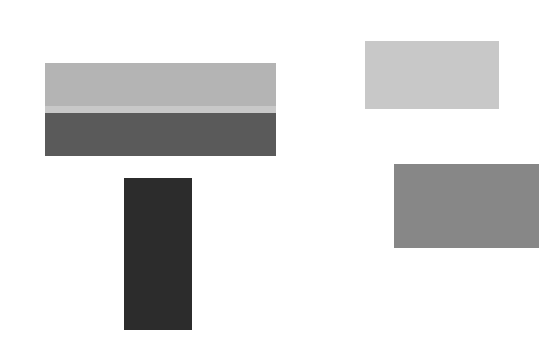
In the top left you can see a so called "high way", i.e. an area where traffic rules strictly prohibit driving on the left. The "lanes" of the high way are separated by a forbidden area, to enfore staying on a lane and to prohibit u-turns. The top-right area is a forbidden area, while the bottom left and bottom right areas prohibit driving downwards and upwards respectively.
Primitive information
As useful as the nogo and speed maps are, drawing them can be a bit of a hassle. This is where the Simple Map Editor comes in - it can load a MCF file, edit all contained map files, and store the changes in a portable way. All nogo and speed areas are represented as geometric primitives, which are stored in the MCF file and rendered to the corresponding nogo and speed map PNG files. This allows for easy editing of previously created maps.
Nogo or speed areas can be defined as rectangles, ellipses or as (possibly self-intersecting) polygons. The relevant tags in the MCF file are the following ones:
Each area is described by the primitive's shape, i.e. rectangles for rectangluar or elliptical areas and a number of points for polygonal areas. Besides that, each area has a descriptive text tag that can be used to provide some meaning or context to a certain area. In case of speed areas, the additional required speed tag specifies the associated speed of this area as a floating point number, ranging from 0 to 1.
Here is an example for a rectangluar speed area:
Elliptical areas look the same way, i.e. their shape is described by a rectangle as well. Note that this implies that rotated ellipses are not supported! Polygonal speed areas look like this:
One-way areas have a slightly different format. While they are restricted to rectangles, they have more additional data associated with it. This additional data is necessary to distinguish the abstract one-way area types that are used in the MapEditor to create and edit them, e.g. a single "high way" area vs. two adjacent "one way" areas divided by an unrelated forbidden area.
A one-way area will look like this:
Where to go from here
With the knowledge about the mapping structure and map files, you can now easily create, edit and load maps. Please refer to the following documentation pages for further information:
- Creating maps: Simple Mapper
- Editing maps: Simple Map Editor
- Loading maps: MCFLoaderPage