State machine class based on the SCXML (http://www.w3.org/TR/scxml/) specification.Can be used for designing programs that use a finite state automaton to realize some kind of flow control.
The following topics are covered in this documentation:
- <scxml>
- <state>
- <initial>
- <final>
- <parallel>
- <history>
- <transition>
- <onentry>
- <onexit>
- <datamodel>
- <data>
- Data binding and scoping
- Events
- Errors
- Executable content
- The Python datamodel
- SCXML Editor
<scxml>
The root of a SCXML config file is required to be <scxml>.
Attributes
- initial = "target_state" (optional)
- The id of the initial state(s) for the document. If not specified, the default initial state is the first child state in document order.
- name="name" (optional)
- The name of this state machine. It is for purely informational purposes.
- datamodel="python" (optional, default="python")
- The datamodel that this document requires. Currently we only support "python".
- binding="early" (optional, ["early", "late"], default="early")
- The data binding to use. early = all data in data model is created and values are assigned at document initialization time. late = all data in data model is created but values are assigned only when the state that contains it is entered for the first time
Nested Tags
- <state> Defines a sequential substate of the parent state. Occurs 0 or more times.
- <parallel> Defines a parallel substate. Occurs 0 or more times.
- <final> A top-level final state in the state machine. Occurs zero or more times. The state machine terminates processing when it reaches this state.
- <script> Provides scripting capability. The scrits are evaluated when the state machine is loaded. Occurs 0 or 1 times.
- <datamodel> Defines part or all of the datamodel. Occurs 0 or 1 times.
Example
<state>
Holds the representation of a state.
Definition: An atomic state is one that has no <state>, <parallel> or <final> children. Definition: A compound state is one that has <state>, <parallel> or <final> children (or a combination of these).
A compound state MAY specify either an "initial" attribute or an <initial> element, but not both. If neither the "initial" attribute nor an <initial> element is specified, the first child state in document order is chosen as the default initial state.
Attributes
- id = "name" (optional)
- The identifier for this state. Auto generated if not specified.
- initial = "target_state" (optional)
- The id of the default initial state (or states) for this state.
Nested Tags
- <state> Defines a sequential substate of the parent state. Occurs 0 or more times.
- <parallel> Defines a parallel substate. Occurs 0 or more times.
- <transition> Defines an outgoing transition from this state. Occurs 0 or more times.
- <initial> In states that have substates, an optional child which identifies the default initial state. Any transition which takes the parent state as its target will result in the statemachine also taking the transition contained inside the <initial> element.
- <final> Defines a final substate. Occurs 0 or more times.
- <history> A child which represents the state configuration that this state was in the last time the system transitioned from it. A transition with this history pseudo-state as its target is in fact a transition to the set of descendant states that were active the last time this state was exited. Occurs 0 or more times.
- <onentry> Optional element holding executable content to be run upon entering this state. Occurs 0 or more times.
- <onexit> Optional element holding executable content to be run upon exiting this state. Occurs 0 or more times.
- <datamodel> Defines part or all of the datamodel. Occurs 0 or 1 times.
Parent Tags
Example
<initial>
This element represents the default initial state for a complex <state> element (i.e. one containing child <state> or <parallel> elements.
Nested Tags
- <transition> A transition whose 'target' specifies the default initial state(s). In a conformant SCXML document, this transition MUST NOT contain 'cond' or 'event' attributes, and MUST specify a non-null 'target' whose value is a valid state specification. This transition MAY contain executable content.
Parent Tags
Example
<final>
This element represents a final state of an <scxml> or compound <state> element.
Attributes
- id = "name" (optional)
- The identifier for this state. Auto generated if not specified.
Nested Tags
- <onentry> Optional element holding executable content to be run upon entering the parallel element. Occurs 0 or more times.
- <onexit> Optional element holding executable content to be run upon exiting this element. Occurs 0 or more times.
Parent Tags
Example
<parallel>
The <parallel> element encapsulates a set of child states which are simultaneously active when the parent element is active.
Attributes
- id = "name" (optional)
- The identifier for this state. Auto generated if not specified.
Nested Tags
- <state> Defines a sequential substate of the parent state. Occurs 0 or more times.
- <parallel> Defines a parallel substate. Occurs 0 or more times.
- <transition> Defines an outgoing transition from this state. Occurs 0 or more times.
- <history> A child which represents the state configuration that this state was in the last time the system transitioned from it. A transition with this history pseudo-state as its target is in fact a transition to the set of descendant states that were active the last time this state was exited. Occurs 0 or more times.
- <onentry> Optional element holding executable content to be run upon entering the parallel element. Occurs 0 or more times.
- <onexit> Optional element holding executable content to be run upon exiting this element. Occurs 0 or more times.
- <datamodel> Defines part or all of the datamodel. Occurs 0 or 1 times.
Parent Tags
Example
<history>
The <history> pseudo-state allows a state machine to remember its state configuration. A <transition> taking the <history> state as its target will return the state machine to this recorded configuration.
If the 'type' of a <history> element is "shallow", the immediately active children of its parent are recorded before taking any transition that exits the parent. If the 'type' of a <history> element is "deep", the active atomic descendants of the parent are recorded before taking any transition that exits the parent. After the parent state has been visited for the first time, we define the set of states that the processor has recorded to be the 'stored state configuration' We also define the states specified by the 'target' of the <history> element's <transition> child to be the 'default stored state configuration.' If a transition is executed that takes the <history> state as its target, the behavior depends on whether the parent state has been visited before. If it has, it behave as if the transition had taken the stored state configuration as its target. If it has not, it behave as if the transition had taken the default stored state configuration as its target.
Attributes
- id = "name" (optional)
- The identifier for this pseudo state. Auto generated if not specified.
- type = "shallow" (optional, ["deep", "shallow"], default="shallow")
- Determines whether the active atomic substate(s) of the current state (deep) or only its immediate active substate(s) (shallow) are recorded.
Nested Tags
- <transition> A transition whose 'target' specifies the default history configuration. In a conformant SCXML document, this transition MUST NOT contain 'cond' or 'event' attributes, and MUST specify a non-null 'target' whose value is a valid state specification. This transition MAY contain executable content. If 'type' is "shallow", then the 'target' of this <transition> MUST contain only immediate children of the parent state. Otherwise it MUST contain only descendants of the parent. Occurs once.
Parent Tags
Example
The following is a log output and shows that after firing the transition B->Ahistory the state machine goes back to A3
<transition>
Transitions between states are triggered by events and conditionalized via guard conditions. They may contain executable content, which is executed when the transition is taken.
See Events for more details on Events and how transitions are triggered by them.
Attributes
- event = "name" (optional)
- A list of designators of events or channel names that trigger this transition. An event descriptor is a series of alphanumeric characters segmented into tokens by the "." character. The 'event' attribute of a transition consists of one or more such event descriptors separated by spaces. An extension to the SCXML standard is the use of channel events. All event names that start with a / are interpreted as channel names. The statemachine subscribes to that channel and fires the event whenever data in the channel changes.
- cond = "expression" (optional, default="True")
- The guard condition for this transition. Must be valid Python code that evaluates to True or False. via the variable _event one has access to the event that triggered this transition (if any) In the case of channel changed events the _event variable contains the data of the channel. The statemachine offers a single predicate to be used in the boolean expression wich is 'In(id)'. The predicate returns true if the current state configuration contains a state with 'id'. Which is, the state 'id' is currently active.
- target = "target_state" (optional)
- The identifier(s) of the state or parallel region to transition to.
- type = "external" (optional, ["external", "internal"], default="external")
- Determines whether the source state is exited in transitions whose target state is a descendant of the source state. Default is external.
A conformant SCXML document MUST specify at least one of 'event', 'cond' or 'target'.
Nested Tags
The children of <transition> are executable content that is run after all the <onexit> handlers and before the all <onentry> handlers that are triggered by this transition.
Parent Tags
Example
<onentry>
A wrapper element containing executable content to be executed when the state is entered.
Nested Tags
The children of the <onentry> handler consist of executable content
Parent Tags
Example
<onexit>
A wrapper element containing executable content to be executed when the state is exited.
Nested Tags
The children of the <onexit> handler consist of executable content
Parent Tags
Example
<datamodel>
<datamodel> is a wrapper element which encapsulates any number of <data> elements, each of which defines a single data object.
Nested Tags
- <data> Occurs 0 or more times. Each instance defines a named data element.
Parent Tags
Example
<data>
The <data> element is used to declare and populate portions of the datamodel.
Attributes
- id = "name" (required)
- The name of the data item.
- expr = "data" (optional)
- Evaluates to provide the value of the data item.
Nested Tags
The children of the <data> element represent an in-line specification of the value of the data object.
In a conformant SCXML document, if the expr attribute is present, the element MUST NOT have any children. Thus 'expr' and children are mutually exclusive in the <data> element.
Parent Tags
Example
Data binding and scoping
There is a single globally visible data model for the entire state machine. Specifically, the state machine allows any data element to be accessed from any state. Thus the data model has no concept of scoping. However, authors control when the initial values are assigned to the data elements by means of the 'binding' attribute on the <scxml> element. When 'binding' is assigned the value "early" (the default), all data elements are created and their initial values are assigned at document initialization time. When 'binding' is assigned the value "late", the state machine creates the data elements at document initialization time, but assigns the value specified by 'expr' to a given data element only when the state that contains it is entered for the first time, before any <onentry> markup. Ordering dependencies between <data> elements are not permitted. In the case of early binding, all <data> elements are evaluated at initialization time but do so in any order. Suppose, for example, that the declaration of element "a" precedes the declaration of element "b" in a document. It is not safe to assume that "a" will be instantiated and have a value when the declaration of "b" is executed. Therefore the "expr" in "b" cannot safely reference the value of "a" (and vice-versa). When late binding is selected, the data model elements are created at initialization time but do so in any order. Similarly, the value specified by 'expr' are assigned to data elements only when the state containing them is first entered, but do so in any order.
Events
Events are one of the basic concepts in SCXML since they drive most transitions. The internal structure of events is platform-specific as long as the following external interface is observed:
- The data contained in an event is accessible via the '_event' variable (_event.data)
- The event's name is accessible via the '_event' variable (_event.name). This name value is matched against the 'event' attribute of transitions.
Events can be raised during the execution of an SCXML document under author control by use of the <raise> and <send> elements. However, certain events are mandatory and generated automatically by the interpreter.
Definition: A transition matches an event if at least one of its event descriptors matches the event's name. Definition: An event descriptor matches an event name if its string of tokens is an exact match or a prefix of the set of tokens in the event's name. In all cases, the token matching is case sensitive.
For example, a transition with an 'event' attribute of "error foo" will match event names "error", "error.send", "error.send.failed", etc. (or "foo", "foo.bar" etc.) but would not match events named "errors.my.custom", "errorhandler.mistake","errOr.send" or "foobar".
An event designator consisting solely of "*" can be used as a wildcard matching any sequence of tokens, and thus any event. Note that this is different from a transition lacking the 'event' attribute altogether. Such an eventless transition does not match any event, but will be taken whenever its 'cond' attribute evaluates to 'True'. The state machine will check for such eventless transitions when it first enters a state, before it looks for transitions driven by internal or external events.
Events can also be generated by channel data changes in the Framework. Therefor the user must add a leading '/' to an events name. The state machine will automaitcally subscribe to that channel and fires an event with the channels name whenever data in the channel changes. The content of the channel when the event was send is available via the '_event' variable.

| As events trigger state changes and transitions they should only be raised when they signal a change (e.g. falling or rising edge). Never use channels that update with a high frequency or channels that contain always the same data. These can lead to an internal overflow of the event queue so that events will be lost or processed with a high time delay. |
The above example subscribes automatically to channel /MyPoseChannel and fires an event named '/MyPoseChannel' whenever data in that channel changes. In this case the structure of the _event variable would be as follows:
Errors
Once the SCXML processor has begun executing a well-formed SCXML document, it signals any errors that occur by raising SCXML events whose names begin with 'error.'. One error event is defined in this specification: 'error.platform'. It category consists of application errors and errors internal to the execution of the document, such as those arising from expression evaluation. The event name is extended by adding a suffix classifying the error and the data element may contain additional information about the nature of the error. Note in particular, that these events are ignored if no transition is found that matches them. Note however that authors can arrange for otherwise unhandled errors to cause the interpreter to exit by creating a transition with "event" attribute of 'error' and a target of any top-level final state (i.e. one that is a child of <scxml>). If such a transition T is placed in a state S, it will cause the state machine to terminate on any error that is raised in S or one of its substates and is not handled by another transition that is placed in a substate of S or in S and preceding T in document order.
List of Errors and Events
The following events are generated automatically by the SCXML implementation under the listed conditions.
- done.state.id : Indicates that the state machine has entered a final substate of state id.
- error.platform.* : Indicates that an error internal to the execution of the document has occurred, such as one arising from expression or script evaluation.
Executable content
Executable content allows the state machine to do things. It provides the hooks that allow to modify the data model and interact with external entities. Executable content consists of actions that are performed as part of taking transitions. In particular, executable content occurs inside <onentry> and <onexit> elements as well as inside <transition>. When the state machine takes a transition, it executes the <onexit> executable content in the states it is leaving, followed by the content in the <transition>, followed by the <onentry> content in the states it is entering.
The SCXML standard specifies that implementations are allowed to define their own content. So we will interpret text children of executable elements as Python script code by default.
<script>
The <script> element adds scripting capability to the state machine. It is equivalent to use no tags at all for executable content but provides an additional feature of sourcing scripts from file via the <id>src</id> attribute.
Attributes
- src = "filename" (optional)
Parent Tags
Example
<raise>
The <raise> element raises an event in the current SCXML session. Note that the event will not be processed until the current block of executable content has completed and all events that are already in the internal event queue have been processed.
Attributes
- event = "name" (required)
- Specifies the name of the event. This will be matched against the 'event' attribute of transitions.
Parent Tags
Example
<send>
The <send> element raises an event in the current SCXML session. Note that the event will not be processed until the current block of executable content has completed and all events that are already in the internal event queue have been processed.
Attributes
- event = "name" (required if no eventexpr attribute is given)
- Specifies the name of the event. This will be matched against the 'event' attribute of transitions.
- eventexpr = "expression" (required if no event attribute is given)
- A dynamic alternative to 'event'. If this attribute is present, it is evaluated when the parent <send> element is evaluated the result is treated as if it had been entered as the value of 'event'.
- id = "identifier" (optional)
- A string literal to be used as the identifier for this instance of send (can be used to cancel queued events)
- target = "#_internal" (optional, must not occur with targetexpr)
- The unique identifier of the message target that the platform should send the event to. If #_internal the event is added to the internal event queue. If #_scxml_NameOfOtherStatemachine the event is send to another instance of a statemachine with name NameOfOtherStatemachine. The name must be the unit name of the target statemachine including the correct namespace. Internally an RPC call of the other statemachines sendEvent method is invoked. If empty (default) it is added to the external event queue.
- targetexpr = "expression"(optional, must not occur with target)
- A dynamic alternative to 'target'. If this attribute is present, is is evaluated when the parent <send> element is evaluated and result is treated as if it had been entered as the value of 'target'.
- delay = "10"(optional, must not occur with delayexpr)
- Indicates how long the processor should wait before dispatching the message. Must contain non negative numbers. Can contain time identifiers for seconds 's' or milliseconds 'ms'. If no identifier is given the number is interpreted as milliseconds (e.g. "5s", "500ms", "1000")
- delayexpr = "expression"(optional, must not occur with delay)
- A dynamic alternative to 'delay'. If this attribute is present, is is evaluated when the parent <send> element is evaluated and result is treated as if it had been entered as the value of 'delay'.
Nested Tags
- Parameters
-
p1 The element is evaluated when the parent <send> element is evaluated and the resulting data is contained in the event. Occurs 0 or more times.
<content>MyContent</content> The element is evaluated when the parent <send> element is evaluated and the resulting data is contained in the event. Occurs 0 or 1 times.
A conformant document MUST NOT specify with <content>.
Parent Tags
Example
<cancel>
The <cancel> element is used to cancel a delayed <send> event. The best attempt is made to cancel the delayed event. Note, however, that it can not be guaranteed to succeed, for example if the event has already been delivered by the time the <cancel> tag executes.
Attributes
- sendid = "name" (required if no sendidexpr attribute is given)
- The id of the event(s) to be cancelled. If multiple delayed events have this sendid, the Processor will cancel them all.
- sendidexpr = "expression" (required if no sendid attribute is given)
- A dynamic alternative to 'sendid'. If this attribute is present, its content is evaluate it when the parent <cancel> element is evaluated and the result is treated as if it had been entered as the value of 'sendid'.
Parent Tags
Example
The Python datamodel
Currently only the Python datamodel is supported. All executable content as well as all data in the data model is interpreted as Python code.
Note that indentations are significant in Python.
A good practice is to import all needed Python modules in the <script> childs of <scxml> node.
Instead of using the data model nodes which is the prefered way of creating variables you can create and assign variables in all the executable content.
To use the framework functionality (e.g. Units, Channel access, RPC calls) from within the statemachine you must import the module mirapy:
Build in functionality
The basic datamodel contains a variable '_sm' that should NOT be overwritten. This variable holds a reference to the statemachine instance and allows to manipulate the statemachine from within the datamodel.
It supports the method 'sendEvent(Event)' that can be used to send events from the data model instead of using the <send> or <raise> nodes.
Also the data model supports the predicate 'In(id)' that evaluates to true if the state with name 'id' is contained in the current state configuration (the state is active).
One can also obtain the current state configuration as a set via the 'getConfiguration()' method:
SCXML Editor
As your state machine grows, a GUI-based editor may come in handy. You can find a (very limited) number of different scxml editors out there, however, the scxmlgui (http://code.google.com/p/scxmlgui/) is most suitable.
An adapted version of that editor has been created to fulfill our needs. The following changes have been made to improve the interaction with our scxml implementation:
- added proper un/escaping of code in script section
- solved the issue of special characters in XML (<, >, &, ", ')
- made sure that code in script sections is indented correctly (essential for Python code)
- corrected some error messages happening when launching the program
- ensured that when saving an scxml document, the file was still understandable. The useless commentaries related to the position of objects within the editor have been removed
- modified the SCXML Listener so that it stops the connection when the client side disconnects
Overview
The SCXML Editor allows you to create new SCXML documents, to open and edit pre-existing files with a graphical user interface and to export the graphs as image files. More information is available at https://github.com/fmorbini/scxmlgui/blob/wiki/Guide.md .
Creating a new file
Open the SCXML Editor by starting the jar file "fsm-editor.jar" in a terminal :
You can then press CTRL-N or click on File->New.
Opening a file
When the editor is already running, you can open a file by clicking on File->Open file. However, to avoid layout display issues it is recommended to use this method only when no other file was open before. You can also start the editor directly with a pre-existing file from the terminal :
The "-l" option is vital to keep a correct layout.
Editing nodes and edges
To create a new node, simply right click on the area where you want to put your node and choose Add node. To edit a node, you can either double-click on it or right click and choose Edit node. The different characteristics of the node can then be modified in the new window which has appeared. To create a new transition, click in the center of the starting node, hold and drag the mouse until the center of the destination node. The edge edition is similar to the node edition : either double-click on an edge or right click on it and choose Edit Transition. You can then modify the properties of the edge.
Each action can be undone by pressing CTRL-Z or redone with CTRL-Y.
To delete an object, select it with a left click and press the Delete key.
Saving a file
To save your file, press CTRL-S or click on File->Save. You can also save the document in a new file with CTRL-SHIFT-S or in File->Save as. There, you have the possibility to export the document to another type (scxml, png, jpg, html, svg, bmp, ...).
SCXML Listener
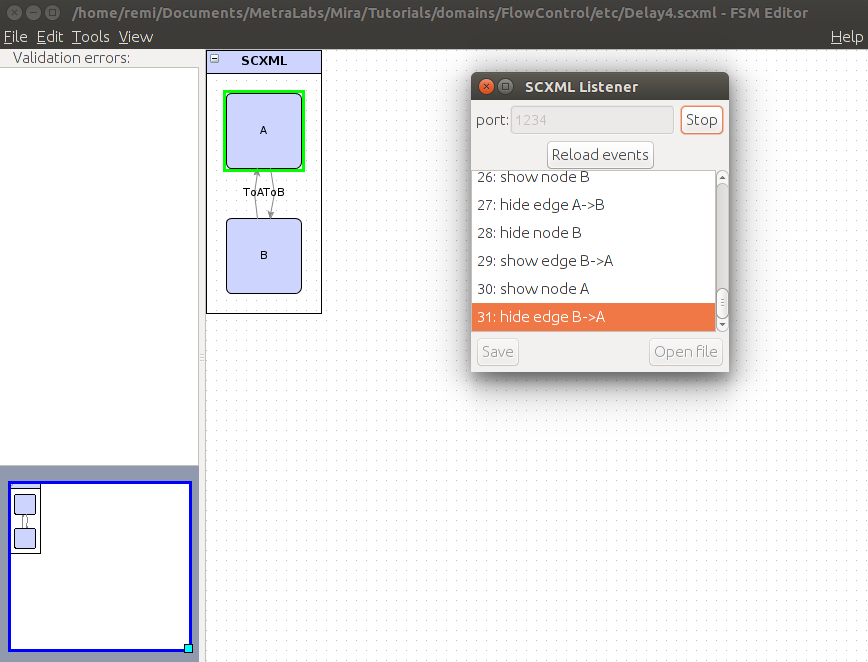
In addition to the basic edition functionalities, the editor offers an SCXML Listener. To use it, open the scxml file you want to listen to and click on Tools->SCXML execution listener. You will have to choose a port to connect to and you can start the connection with the button Start. The program will then begin to wait for the connection to this port (using TCP) of another program which is supposed to implement the corresponding state machine. When the connection is established, each time a new node or a new transition is encountered in the execution of the state machine, it is added to the listener and highlighted on the graph. One can thus follow the evolution of the execution of the state machine. When the program executing the state machine breaks the connection, it should send to the listener the phrase "disconnecting", which will then stop the connection on the listener side as well.
To learn more about the client side of the TCP connection which is supposed to run the state machine, read the documentation on FlowControl.